
The Claude Quick-Start
- A quick-start on setting up Claude so it's more than a chatbot.
- The seven skills I've built, about 200 hours of work, to swipe today.
- Eight tips that took me months to find. Now they're yours.
Two years at the keyboard getting these to work.
spent on AI tooling.
hours since June 2024.
skills and automations, each one a job written down once.
What it made
Four things Claude does for me.
Workflow #1 (Farah)
A demo call ends. The proposal writes itself.

1. It spots the demo
Every six hours it checks the calendar for a demo call with no proposal yet.

2. It pulls the transcript
The Fathom recording of the call, plus everything already in the prospect's file.

3. It writes the proposal
Situation, goal, blockers, objections, pain points. In the prospect's own words, in my template.

4. It lands in my inbox
Ready to read on the train back. I fix the odd line and send.
Workflow #2
A WhatsApp account connected to AI.
Workflow #3
The lead magnet builder.
Workflow #4 (Sophie, Farah)
LinkedIn posts in my voice.
Satire, from the reddit-find and last30days skills plus market knowledge, so it picks up timely events in the market and writes about them the way I would.
The set-up
Four things to copy.
Setting up Claude for maximum power
The file structure.
Reason: Claude can read your history and improve itself much more easily.
Setting up Claude for maximum power
The .env file.
Reason: one file holds every API key. Claude reads it, and any tool with a key in that file is one sentence away.
The file is ignored by git and hidden from every transcript.
Setting up Claude for maximum power
CLAUDE.md
Reason: without it every session starts from zero. It's read first, every time, so your rules apply without you repeating them.
Setting up Claude for maximum power
Todoist, Playwright, the build loop.
Skills to swipe
The seven skills.
One of the six, running
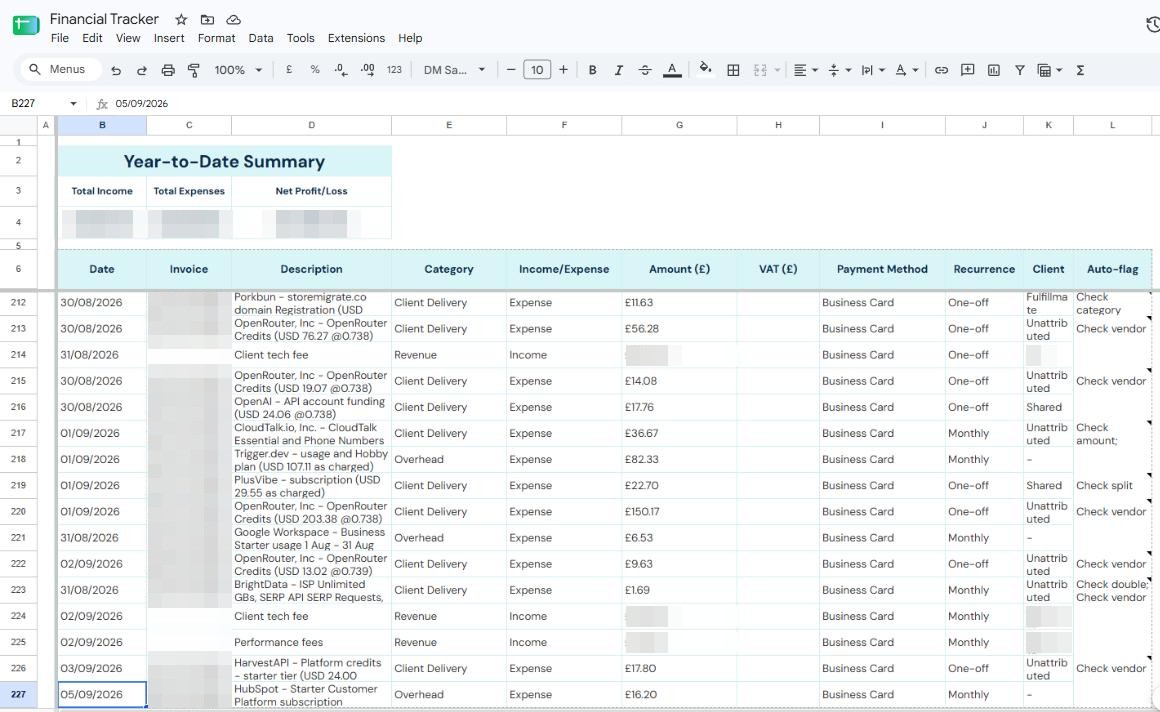
Receipts, collected every night.
finance-inbox (Tom's ask)
At 19:00 it reads the inbox, logs each invoice into this sheet in GBP with a category, ignores the newsletters, and flags anything it's unsure of. For portals that never email a receipt, a browser logs in once a month and collects them.
Tips
What I wish someone had told me.
Next steps.
The receipt-handling one Tom mentioned, for instance. Message me on Slack and we'll book a call.